Succession Plan — configuration guide
Prepare succession planning through a legacy People Review questionnaire and campaign. The configuration below determines who is reviewed, who may review them and which readiness ranges appear. The functional guide covers nomination and calibration; the technical guide explains storage and implementation limits.
Access and dependencies
| Dependency | Scope and evidence |
|---|---|
| People Review module | Tenant activation and permissions make the People Review questionnaire type available. |
| Questionnaire access | An authorized administrator needs Performance → Questionnaires and questionnaire creation/editing access. |
| Campaign administration | Campaign administration and broad review visibility are separate from being assigned as a reviewer. |
| Employee relationships | Selected campaign relationships resolve the reviewers for the reviewed employees. Check populated profiles and resulting assignments. |
| Collective access | Campaign administrator, master administrator or broad review access; being an ordinary reviewer alone may not include collective access. |
| Self-review | Access to one's own review depends on the applicable self-review permission. |
Succession planning in this guide is configured through People Review. Job-offer succession settings belong to a separate workflow.
1. Build the questionnaire
Open Performance → Questionnaires → Create, choose People Review, and confirm Sélectionner. Give the questionnaire a clear title and save it before adding questions.
In the Questions tab, choose Add a question → Succession plan.
| Field | Allowed input / effect |
|---|---|
| Title of the question | Required title, shown to reviewers. |
| Instruction of the question | Rich-text guidance for the reviewer. |
| Time frames | Each option has two numeric bounds, displayed as a range in years. |
| Add one option | Adds another pair of bounds and another readiness column. |
Enter a lower and upper bound for every option, then choose New. For example, bounds of 0 and 2 define a 0-2 YEARS readiness period; choose horizons that reflect the planning process.
Enter both bounds in each option and review the resulting columns. Use ordered, non-overlapping ranges that clearly describe readiness periods.
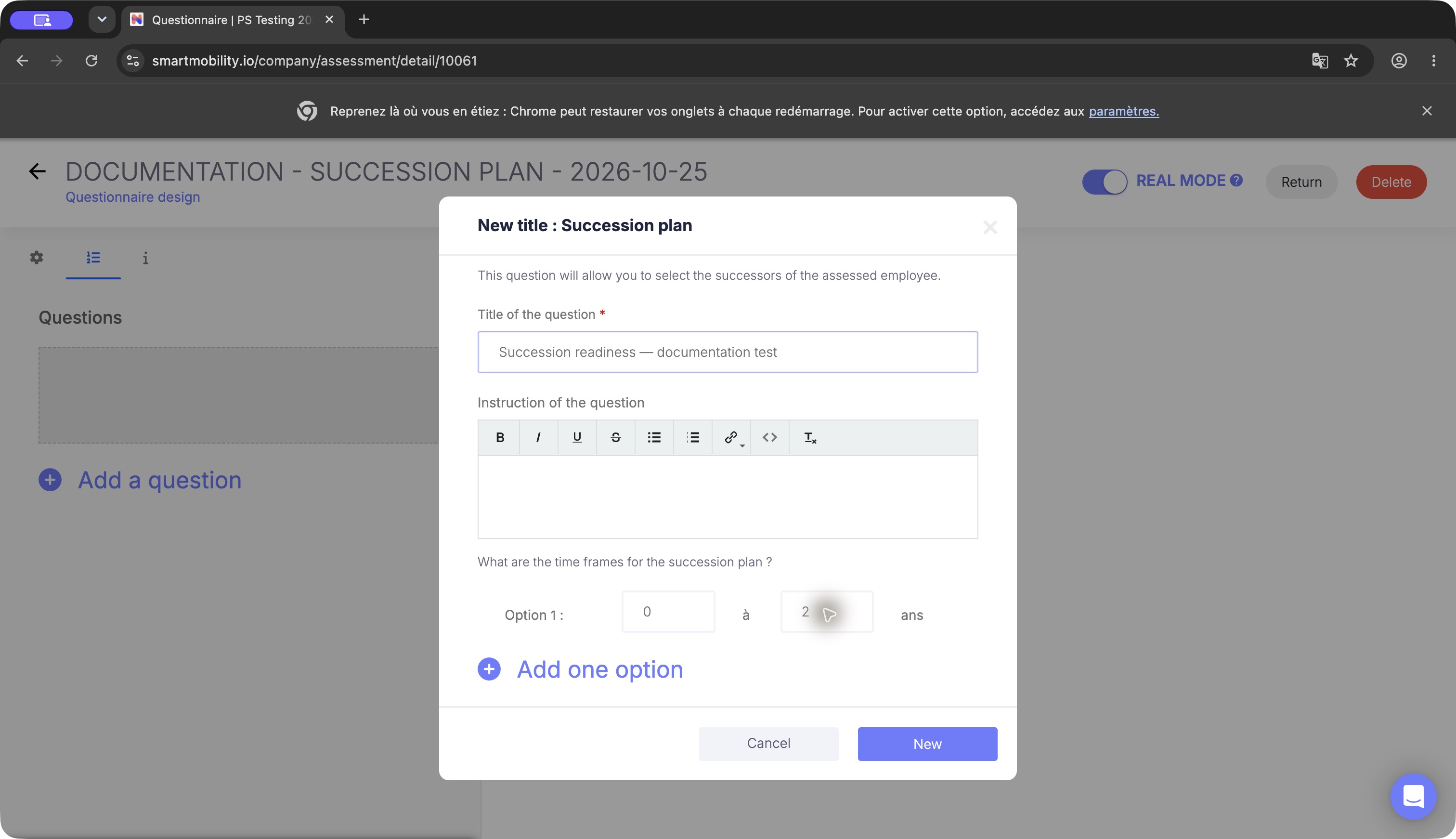
The succession question editor contains lower and upper bounds in years. Review both before saving; a 0–2-year range is one possible configuration, not a required product interval.
Add Collective succession plan as a second question when the committee needs a shared board. Give it a title and optional instructions; it uses the readiness ranges from the individual succession question in the same questionnaire. Keep one individual succession question per questionnaire.
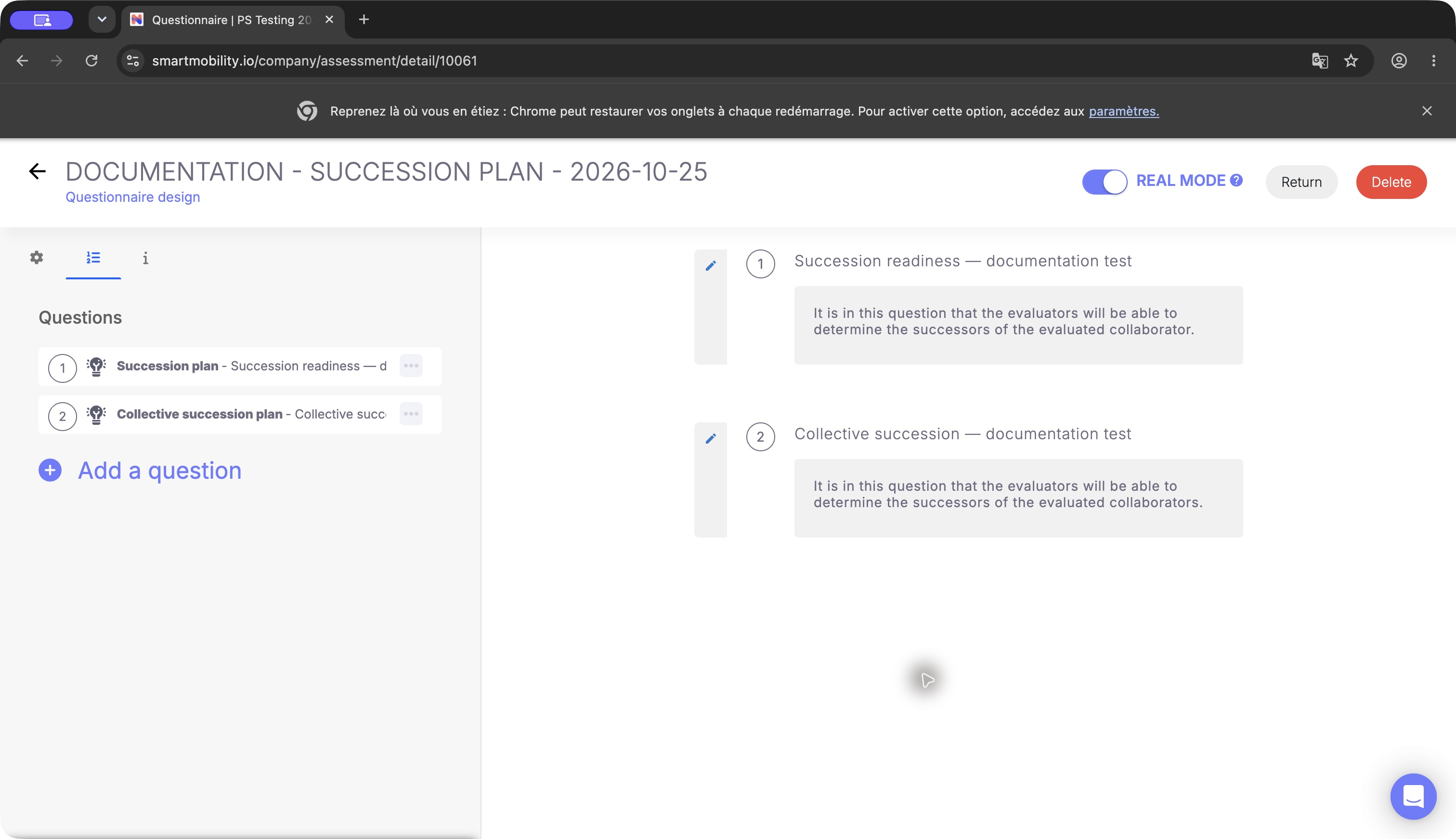
The questionnaire contains distinct individual and collective succession questions. Keep both when the campaign needs nominations and a collective view; seeing their question cards does not show a successor nomination.
2. Configure the campaign
Prepare the campaign and its population, reviewers and questionnaire in the following order:
- Open Performance → People Review → + People Review. The entry creates a draft immediately. Complete Informations: name, description, draft/published status, start/end dates and times. Review relationship access and optional session/annual-interview links.
- In Concerned Employees, choose Add the concerned Employees, filter/search, select the intended rows and Add to list. Continue to reviewers.
- In Reviewers, check the automatically resolved people and administrator flags. Reviewer Administrator gives broader campaign access; keep this separate from normal reviewer assignment. Continue to the questionnaire.
- In Questionnaires, select the prepared questionnaire and save. The selector lists forms of type People Review.
- In Planification, inspect notifications and reminders. Schedule email only when intended, then save.
Use the summary to check the saved questionnaire and employee count. Open Go to the review → GO TO to confirm the individual time columns, and Access to collective review to confirm the collective tab.
Activation and safe changes
Draft status alone does not establish that individual review editing is locked. Confirm the campaign's current status, dates and assigned permissions before collecting operational nominations.
Before launch, verify ranges, population, reviewer scope, questionnaire and communication. Keep readiness labels consistent after nominations exist, because existing proposals are associated with their configured periods.
For a correction, restore the previous complete range pairs and reopen both views. Use a new questionnaire/campaign for a materially different planning cycle. No automated undo, bulk migration or archival workflow was verified. Card deletion is not a configuration rollback.
Redesigned module configuration
The nextgen admin module can provide a separate Succession Plan entry, search/status controls and a name/description form, depending on deployment.
The standalone nextgen module and legacy People Review workflow are separate. Confirm how the nextgen module saves plans before using it operationally; its statuses are not the legacy campaign lifecycle.
Validation and troubleshooting
| Issue | Check |
|---|---|
| Form absent from campaign selector | Confirm its People Review type, tenant and saved name; do not select a different form just to advance. |
| No readiness columns | Check complete paired bounds in the individual question, then the campaign's attached questionnaire. |
| Collective board absent/empty | Check collective question, linked individual question, reviewed population and saved nominations. |
| Wrong reviewers or access | Review campaign relationships and actual profile links; per-campaign administrator and global rights have different scopes. |
| Nomination disappears after range edit | Restore the original labels; inspect stored period compatibility before changing answered forms. |
| Plan not present after nextgen creation | Reopen the plan list and confirm the saved result; contact your administrator if it is missing. |
Implementation reference
Legacy questionnaire and campaign behavior is implemented in src/Company/AssessmentBundle/Controller/AssessmentQuestionController.php and src/Company/ReviewBundle/Controller/{DefaultController,ReviewAssessmentController}.php. The redesigned module has separate navigation and configuration under src/modules/NavigationModule/ and src/modules/ModuleConfig/SuccessionPlan/.
The collective-board layout and campaign completion are illustrated. Card movement and deletion controls, and any development-plan link, depend on the enabled workflow; use the appropriate confirmation before changing saved nominations.
Last updated on 3 November 2026