Tests and assessments — configuration guide
Configure provider availability, result visibility, skill conversion and operational access before assigning tests. See the functional guide for the user journey and the technical guide for the underlying services.
Unless marked otherwise, configuration behavior below is Verified in code in smartmobility-legacy. Live inspection for this update stayed in PS Testing 2026 as Jim Carter. Jim can open the manager catalogue and his personal test centre, but opening company provider settings returns You are not authorized to access this resource. Configuration steps below therefore describe the administrator workflow verified in code; no provider settings or imports were saved in this update.
Prerequisites and access
Provider setup requires the company's authorized administrator. Jim's manager catalogue access did not grant this access. Verified in code: the settings controller requires a company School associated with the authenticated user and rejects a child School.

The provider-settings route displays an authorization denial instead of configuration controls. Return to the authorized manager journey and ask the administrator about provider access; no provider setting is established by this page.
Confirm provider availability with the company administrator before assigning tests. Keeping the Jim Carter account active means provider activation cannot be completed through this denied settings page.
The inspected factory implements Central Test (CT), CodinGame (CG), SkillValue (SV, SVv2) and Goshaba (GSB). These are code-supported adapters, not a promise of active commercial availability. The older settings template also mentions AssessFirst; that mention does not establish a matching adapter in the current factory.
1. Prepare the company test setup
- Identify the company administrator responsible for test settings and the provider account.
- Confirm which provider catalogue and languages should be available.
- Define the intended result audience before assigning employees.
- Confirm manager populations and action permissions.
- Prepare test-to-skill mappings and score conversion if results should update the skills framework.
- Review notification content and language before enabling email assignment.
Observed in application: Jim's Performance → Tests Marketplace displayed 87 Tests, with CodinGame cards and pagination. A sample SQL Senior test could be assigned to Jim, and its mandatory switch persisted after reload. Provider-settings access remained denied. Catalogue availability, local assignment and provider execution are separate readiness checks: launching the assigned test returned an unavailable-test error.
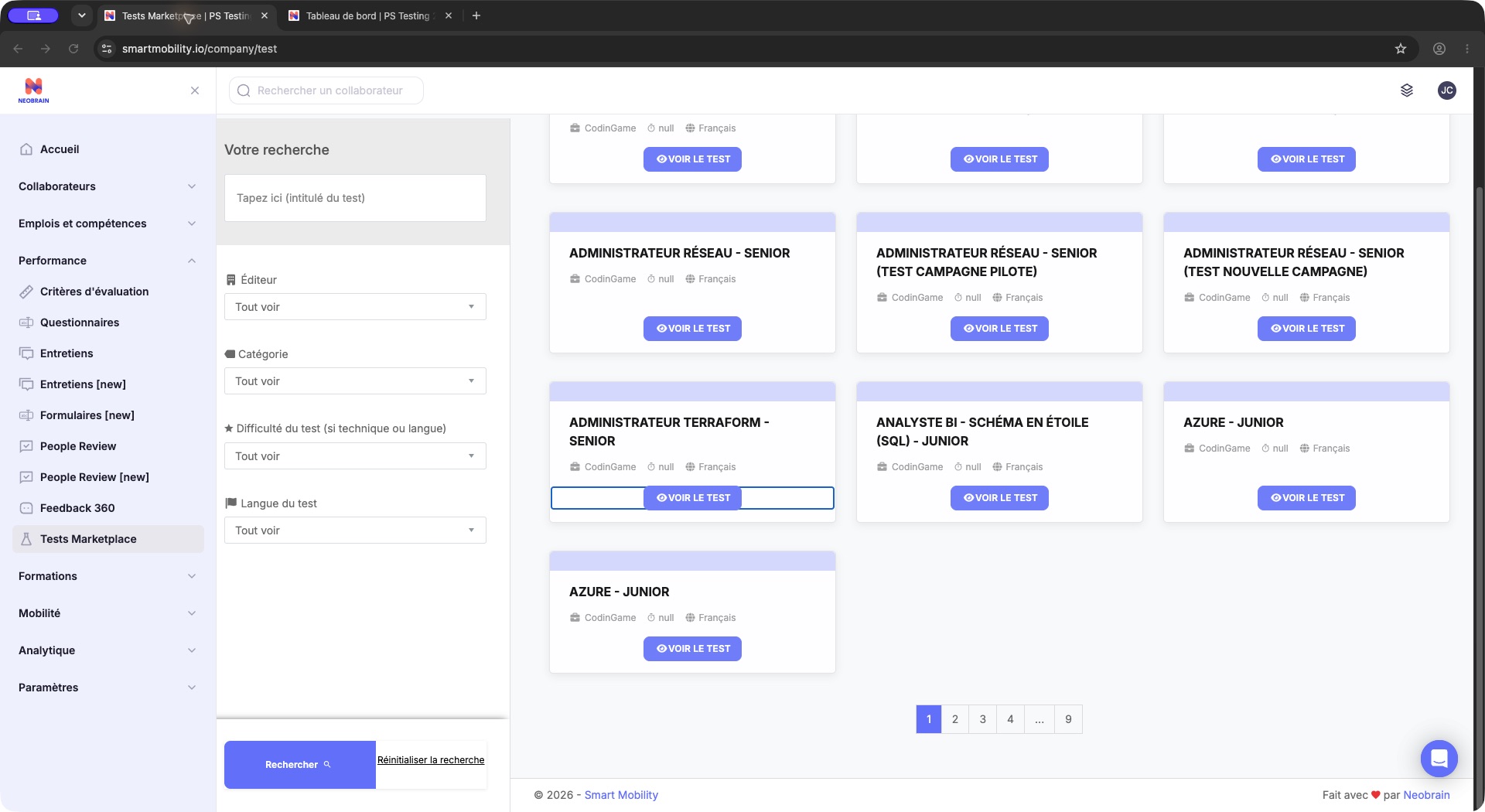
The French catalog shows provider-test cards, search criteria and VOIR LE TEST actions. Search by the intended title/provider and open a card to inspect its details; the displayed catalog count is an example, not a product limit.
2. Enable providers and choose result visibility
In the company configuration, open Gestion des tests where available. The current template shows a Centre de test, Status and Visible par table.
- Review the entire provider selection, including providers you intend to keep.
- Enable the desired providers using their status switches.
- For each enabled provider, choose the result audience under Visible par.
- Apply the provider section only after checking its full selection and audience.
- Reopen the catalogue to confirm the expected tests are available.
| Field | Allowed values / effect | Scope and defaults |
|---|---|---|
| Provider status | Enabled or disabled in the company selection. | Company Setting; checked when an associated SettingTestcenter exists for that provider. No universal enabled default was established. |
| Result visibility | Manager only (only_manager_see), employee only (only_collaborator_see), both (both_can_see). | Company/provider preference; copied into new assignments. Do not assume a default when no choice exists. |
| Goshaba client ID and secret | Provider-issued values for the intended company account. | Company and provider type. Saving invokes the Goshaba catalogue import command. Keep values out of documentation and screenshots. |
Existing-result effect: provider save bulk-updates visibility for matching company/provider results whose is_changed_visibility is 0. Explicitly changed visibility is excluded by this query. This is more than a default for future assignments; review existing result access before applying it.
Selection effect: the save handler treats submitted checked providers as the desired set. It adds their catalogue links and cleans up omitted provider preferences and company/test links. It does not establish deletion of all historic result records, but deactivation can remove tests from employee availability. An empty payload is rejected; do not assume that switching every provider off is supported by this form.
3. Configure score-to-skill conversion
The settings screen has separate default and Goshaba score-ratio forms. The company's mastery-level count determines the number of conversion bands.
- Confirm the mastery scale with the skills framework owner.
- Review every lower/upper score bound and the level it represents.
- Fill every required score field, then apply the score section.
- In an authorized test environment, verify boundary scores, converted skill levels and existing test-derived skills before wider use.
When missing ratios are initialized, TestSettingsService divides 0–100 into rounded equal-width bands for the configured level count. For four levels this generates [0,25], [25,50], [50,75], [75,100]. These are generated bounds, not a guarantee that every provider interprets each boundary identically.
Existing-skill effect: score-ratio save invokes recalculation of company Userskill records with source Test. The inspected recalculation reads the default ratio; separate provider import paths have their own mapping logic. Boundary conversion needs validation with representative results; the technical guide records an implementation concern in this recalculation path. Restoring a previous form value is not a verified rollback of every resulting skill update.
English level tests
A separate required-score control updates the company's configured A1, A2, B1, B2, C1 and C2 records. The settings view loads the displayed value from active A1; saving applies the submitted value to existing records across those levels. There is no verified universal required score. This progression flow is distinct from ordinary report-based completion.
4. Map tests to skills and potentials
Use the test detail's skills and, when supported, potentials panels to review the intended mappings. The inspected controller offers company skills from public referentials and separates Goshaba potentials from other provider potentials.
A configured mapping is only one dependency: provider result imports and employee context determine the actual update. For example, the SkillValue v2 ordinary skill import checks for an assigned job before invoking skill assignment. Validate an actual completed test before promising portfolio updates. Test scores, mastery levels and personality/potential dimensions are distinct values.
Add mappings and review revalidation
Observed in application: VOIR LE TEST → Match de compétences opened the SQL Senior test's mapping panel, which stated Oups! Vous n’avez pas de compétences liées à ce test. Ajouter une compétence opened the Compétences dialog. Saving mapping changes remains Verified in code only.
- Open Match de compétences in the test detail. Its tab is offered when the role permits
edit_test_skill, or when no restrictive permission object is set. - Choose Ajouter une compétence and select the company skills. For potential-based tests, group skills under the relevant potential.
- Review Réévaluer les compétences déjà attribuées before submitting. It was checked in the live dialog. Where the role permits
company_test_reinittest(or no restrictive permission object is set), this checkbox is rendered checked by default. - Validate the selection, then inspect both the mappings and affected employee assignments/skill ratings.
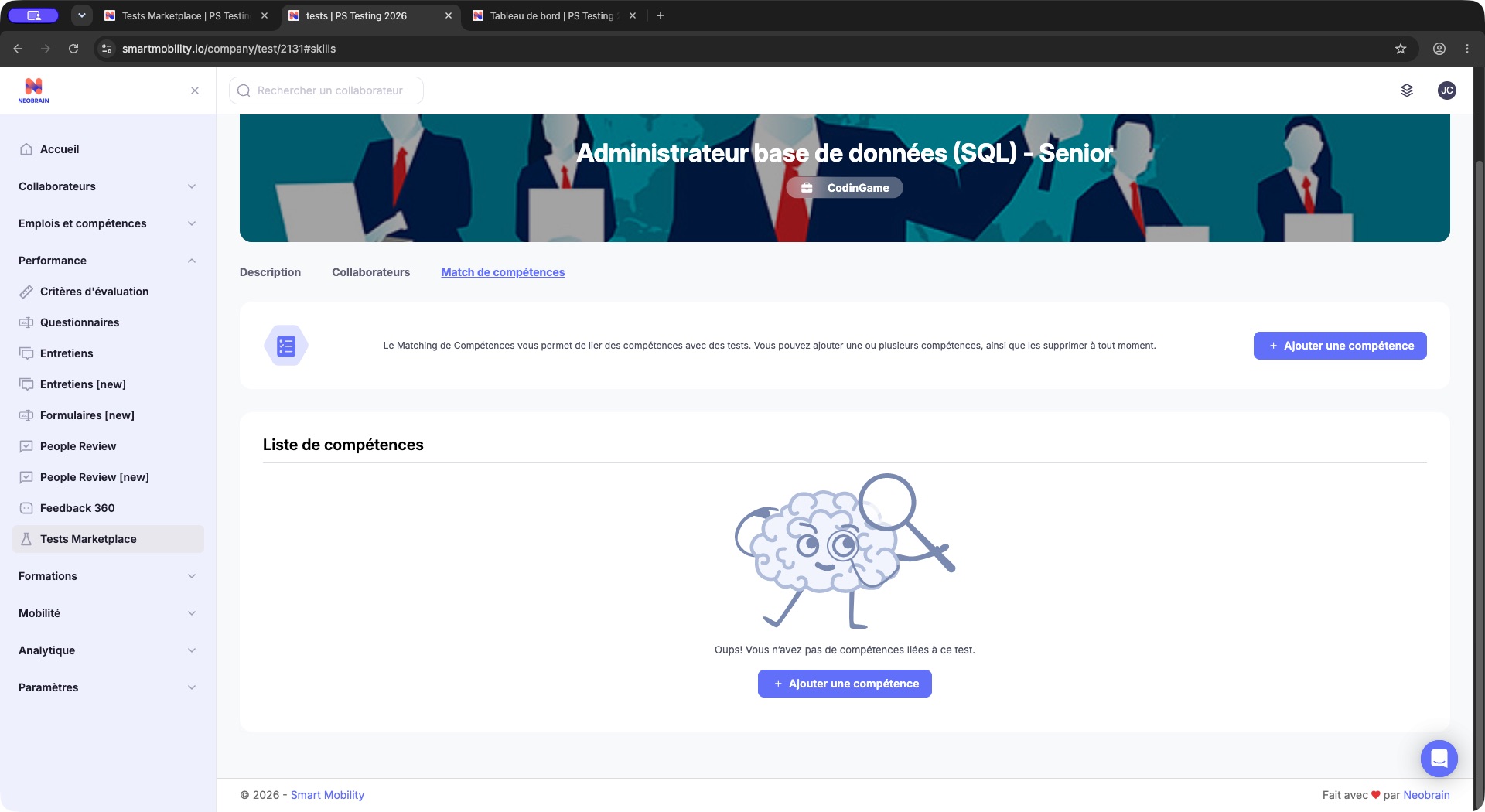
Match de compétences is selected and no skills are mapped to this test. Use the permitted add-skill action to prepare a mapping; an empty map is separate from employee assignment or test completion.
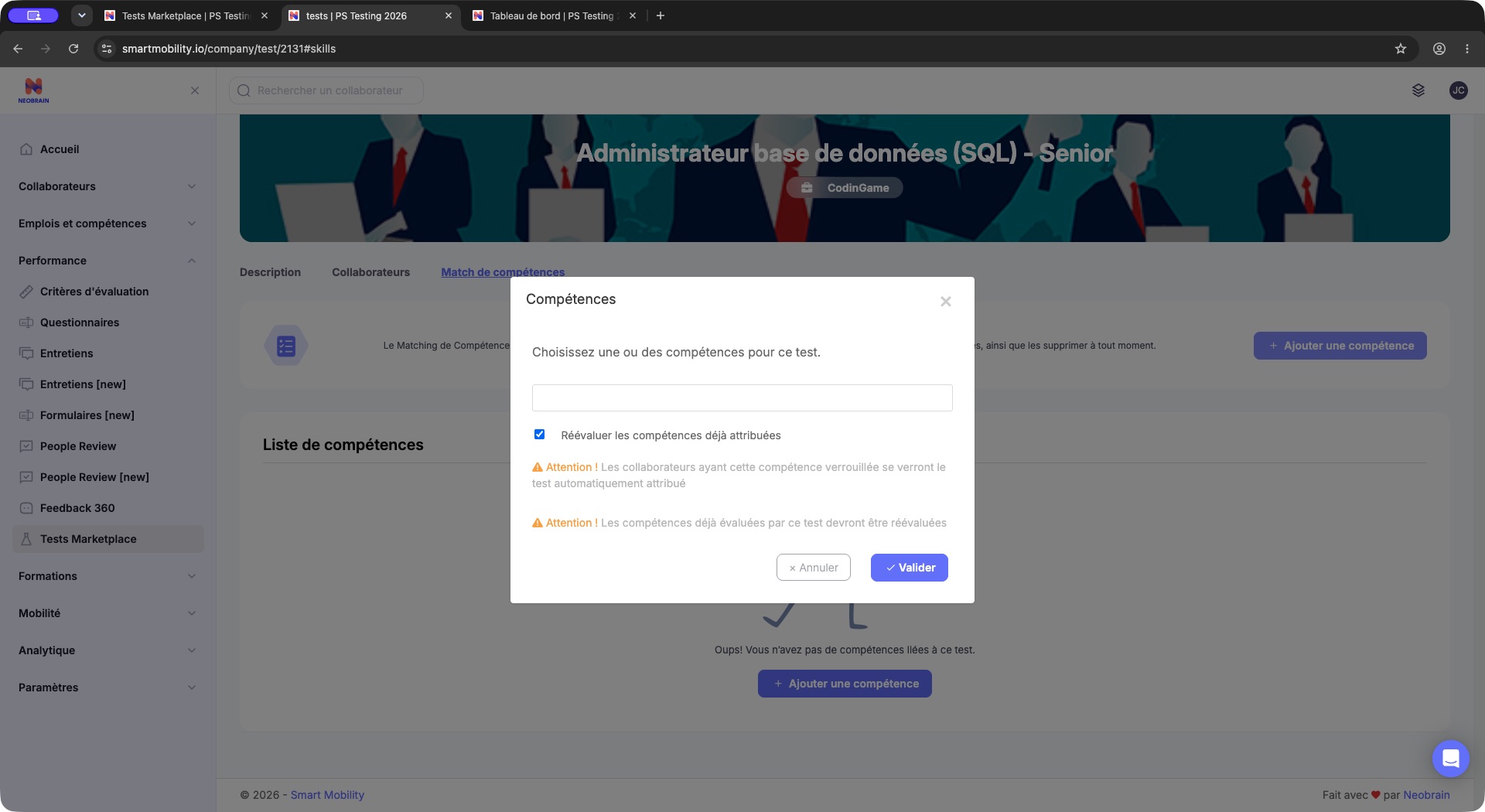
The skill-mapping dialog includes the existing-assessment overwrite option and warnings about mapped skills. Read those effects before validating; the open, unsubmitted dialog does not show a saved mapping or converted score.
Observed in application: the dialog warns that employees with a locked mapped skill will be assigned the test automatically, and that skills already evaluated by that test will need re-evaluation. The dialog was closed without saving.
Verified in code: adding mappings has operational effects: when new links are inserted, the handler finds employees whose current jobs use the mapped skills and calls test assignment with reassignment mode, without assignment email in that call. With revalidation selected, matching test-derived skill records have their mastery set to zero, source cleared and stored test score cleared. Exact provider retake behavior still depends on the adapter.
Remove mappings
Review the removal confirmation before validating it. Verified in code: the handler deletes selected company/test mapping links, then resets matching portfolio skills whose source is Test to mastery zero with source and test score cleared. Removing a mapping is therefore not a cosmetic change. This reset does not establish deletion of the underlying provider report or test attempt. See the technical guide for query-scope and response-counter limitations.
5. Configure access and notifications
| Control | Verified responsibility |
|---|---|
| Authorized population | UserAllowedService scopes manager participant tables and candidate selection. |
mandatory_tests | Controls mandatory status actions and restrictions involving mandatory assignments. |
test_reassigned | Controls whether reassignment is offered in participant controls. Provider support is still required. |
test_d | Controls deletion affordances in the participant table. Backend deletion additionally checks company and mandatory-result conditions. |
edit_test_skill | Controls the test-detail skills tab. |
company_test_reinittest | Controls the add-mapping revalidation checkbox, rendered checked when offered. This UI condition is distinct from server-side enforcement. |
| Assignment notification | TEST_ASSIGNMENT template; test detail checks its presence in the company's default language. Mail is optional during assignment and is sent only for new records in the traced endpoint. |
These controls are not interchangeable. A UI permission check is not proof that every related endpoint enforces the same population restriction. See the technical guide's access-control limitations.
CodinGame launch prerequisites — implementation reference
Verified in code: CGTestManager::supports() requires company values for company_api_CG and a nonempty company_api_CG_url, in addition to a valid employee, company and test. Registration uses the test's external campaign identity. These keys are implementation identifiers; their live values were not inspected and must be configured by the integration owner. Enabling catalogue visibility alone does not establish that these dependencies work.
The observed unavailable-test error does not identify which dependency failed. Ask the integration owner to check the existing attempt, provider response and launch URL before creating another assignment. The sample's launch failed; no assessment was completed.
Validation, rollout and safe changes
Validate configuration with approved test accounts: catalogue discovery, correct language, one assignment, intended notification, external launch, completion, result audience and mapped skill level. The sample verified catalogue access, one assignment with email disabled, required-status persistence and employee-card display. Launch returned an unavailable-test error, so provider execution, completion and result-based skill updates remain unverified. Company provider settings were still denied to Jim.
Apply changes to providers, visibility, score ratios and language thresholds deliberately: the forms have separate save actions. Record the previous intended values in the company's normal change process. Re-enabling a provider or restoring thresholds does not guarantee restoration of prior catalogue links, invitations, result visibility or skill ratings. Review affected records rather than promising a one-click rollback.
| Problem | Configuration checks |
|---|---|
| Empty catalogue | Provider selection, company/test availability links, catalogue import, inactive status, language and filters. |
| Visibility differs between two results | Company/provider preference versus assignment-level visibility and is_changed_visibility. |
| Skill level changes unexpectedly | Ratio changes, company mastery scale, provider import path and test-to-skill mapping. |
| Retake unavailable | test_reassigned, existing pending attempt and provider implementation. |
| Goshaba tests absent after setup | Correct company keys and catalogue import outcome. Saving keys runs an import; it is not merely storing a value. |
| Settings denied | Authenticated company context and the top-level School requirement. |
Legacy, redesigned and older settings
The traced current settings template is testPartners.html.twig. The older tests.html.twig contains provider credential forms and descriptions, but should not be treated as the authoritative source of current adapter support. No equivalent nextgen provider-settings implementation was identified in targeted searches. Navigation and provider availability remain deployment-specific.
Evidence and limitations
- Observed in application: 23 October 2026, Chrome, PS Testing 2026 as Jim Carter; Performance → Tests Marketplace with 87 tests; sample CodinGame detail, assignment to Jim with email disabled, mandatory toggle persistence, personal pending card, mapping dialog with revalidation checked, unavailable-test launch message and denied provider settings. Embedded captures come from this PS Testing/Jim session.
- Verified in code:
src/Company/AccountBundle/Controller/SettingController.php(testPartnerAction,saveTestPartnerAction,saveScoreRatioSkillAction,updateUserSkillsNoteByNewScoreRatio);Service/{TestSettingsService,HandleTestPartnerSavingService}.php;Resources/views/Setting/{testPartners.html.twig,js/testPartners.js.twig};src/Main/ConfigBundle/Repository/Test/TestResultRepository.php;src/Company/TestBundle/Controller/InterneController.php;src/Main/ConfigBundle/Controller/TestController.php,Repository/UserskillRepository.php;src/Company/TestBundle/Resources/views/Interne/Includes/{_test_view-body,_test_skills-modals}.html.twig;src/Service/TestMarketplace/(all paths relative tosmartmobility-legacy). - Inferred: the rollout sequence is recommended administration practice.
- Not verified: editable provider settings, credential values/imports, mapping writes, email delivery, successful provider execution, score-boundary correctness and rollback outcomes. One local sample assignment was created for Jim. Mandatory status was toggled on, checked after reload and returned to optional; assignment email remained disabled. No provider settings, mappings, answers or result-sharing changes were saved.
Last updated on 3 November 2026