User management — redesign configuration guide
Ownership matrix
| Owner / scope | Legacy | Nextgen |
|---|---|---|
| Project / platform core | Company languages, employee field definitions, legacy navigation/profile rights, import activation and identity-source setup. | Space and action permissions, visibility resolution, API provisioning and group-rule consumers. |
| Customer administrator | Authorized employee creation, profile maintenance and activation controls; configured columns and filters. Import access requires separate activation/rights. | Authorized redesigned user list, two-step manual creation/editing and status maintenance; roles/groups/visibility are separate setup areas. |
The legacy and redesigned lists can coexist in the company workspace. Access to the entry point and permissions within the redesigned list are separate; configure and review each through its authorized workflow.
Customer administrator — nextgen
Establish access and prerequisites
Prepare the people allowed to administer users, then grant only the required user actions and population through the separate Roles and permissions configuration. Read, create, update and delete are distinct rights. An employee's manager relationship is not a substitute for these rights.
Before manual creation, confirm that the intended job is present and the manager is available. The checked frontend job picker loads catalogue pages but excludes entries with a null code or no translated titles. Manager options are fetched separately with the manager-only API filter. Missing options can therefore reflect data, permissions or picker rules rather than absence of a person/job.
Configure account details through the guided form
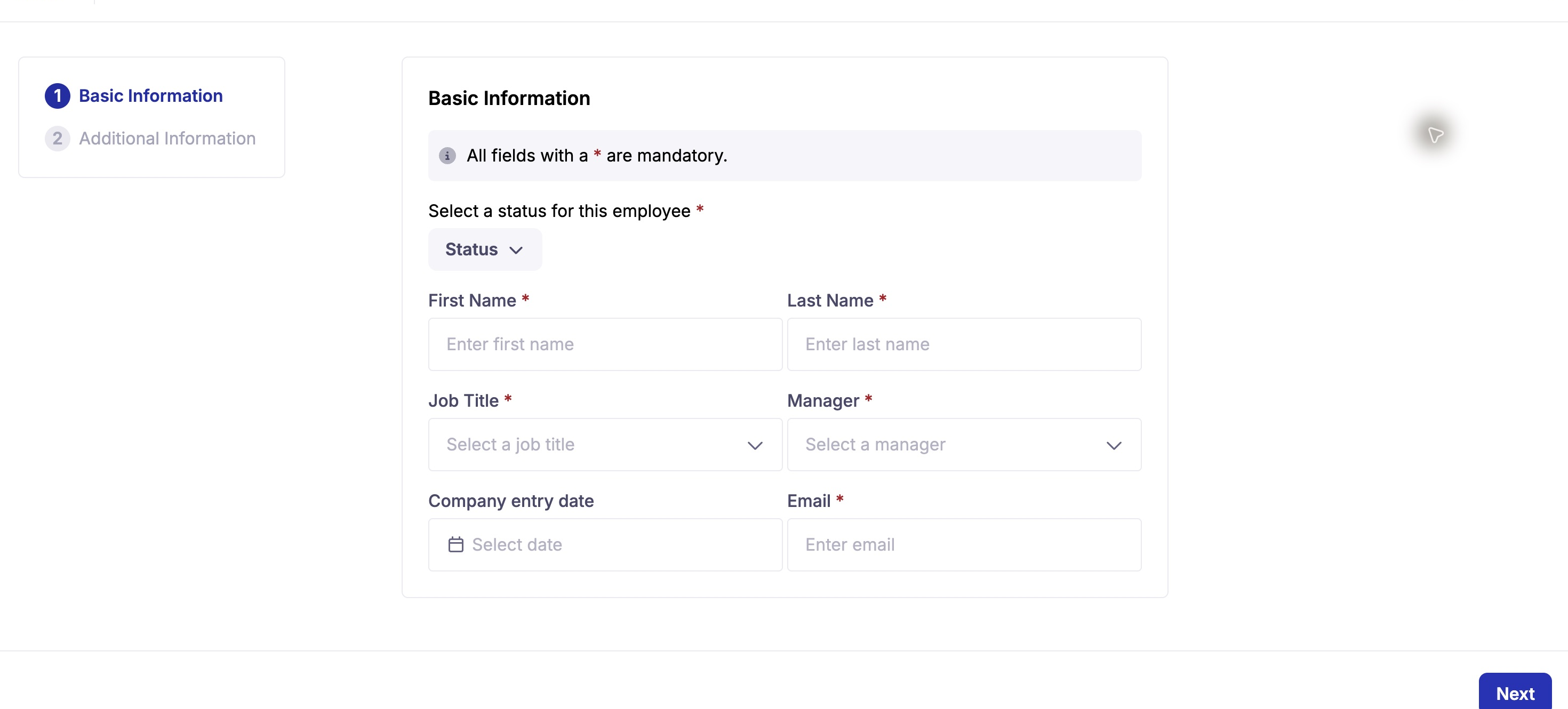
Basic Information is the first wizard step. Complete the required identity, status, job and manager fields before continuing.
| Setting / field | Values, required state and default evidence | Effect / dependency |
|---|---|---|
| Status | Active or Inactive, the form requires a selection; required by the frontend. API DTO defaults to true if omitted. | Account enabled state, separate from role grants and employee classification. See the payload caveat below. |
| First / last name | Required nonempty text. Backend creation constraints limit each to 100 characters. | Backend generates the display username from these values. |
| Required valid email; backend maximum 180 characters and canonical uniqueness. | Identity field. Manual POST rejects duplicates; it is not the import upsert operation. | |
| Job | Required by the wizard; company job catalogue selection. | Read-only field in the user DTO, assigned through a separate job endpoint. Do not expect putting job_id in a user POST to attach it. |
| Manager | Required by the wizard; company-scoped identity, resolved to a manager/School record. | Reporting relationship. Backend DTO allows null, so wizard requirements and direct API requirements differ. |
| Company entry date | Optional visible date control. | Confirm that the date is saved in the employee record before relying on it. |
| Country / city / address / birth date | Additional Information fields, optional in the frontend schema. | The code defines an age-at-least-18 check if birth date is supplied, but the last-step submit condition can proceed without honoring the result. Do not rely on it as a proven enforcement guarantee. |
| Locale | Creation helper starts with the company locale; no language selector was observed in the first step. | Backend validates supported locale. UI language and the new account's locale are separate settings. |
For details about status payloads, field clearing and differences between create and edit behavior, see the technical guide. Confirm the final account status and employee details after saving.
The user record and job assignment are separate. After saving, reopen the record and confirm both identity and job before retrying an operation.
Status maintenance and recovery
Use list filters to inspect the intended population before an approved status change. The top filter is read-only; row and bulk status controls write account state without a separate page Save. Header selection covers the loaded page, while selected IDs can remain across pages/filters.
Bulk status changes are individual requests, not atomic. Bulk status changes apply to individual accounts and may not complete as one all-or-nothing operation. Reopen the affected accounts to confirm their state. Clear selections after the operation. Reactivating a user does not restore information erased or overwritten by an external source.
Platform-team reference — nextgen
Provision the appropriate space permission and exact action permissions read-user, create-user, update-user, delete-user, with the intended visibility population. UserRepository::findUsers applies company and visibility handling; an empty resolved visibility-group set does not universally mean zero results. The current base repository returns the company query unchanged in that case. Validate representative allowed/denied populations rather than assuming the playbook's default N-1–N-3 statement applies to every route.
Prepare supported locale values, unique canonical email identities and valid manager links. The backend creates a related Customer profile and separately manages job assignment. The nextgen DELETE handler disables the account despite the route's soft_deletable: false metadata; do not advertise data erasure from that route.
User creation/update publishes group-rule work, including default visibility and manager-change recalculations. Prepare the associated consumers and monitoring; immediate recalculation and complete rollback were not verified. AIhub has its own extraction/standardization flow, not a proven synchronous account-administration mirror.
Imports, identity ownership and rollout
Documented in Confluence: Import Center for Users, v2, 29 April 2025, describes parsing → mapping → validation/preview → import, asynchronous processing, valid-row import and email-based updates. It recommends creating users before manager links and preparing visible SmartEditor fields first.
The same page contains inconsistent statements about job title versus job code and deactivation availability. Do not copy those as a current universal template. Nextgen has a separate /api/v1/user/import upsert contract keyed by employee/external ID or email, with its own scopes and DTO. Agree identifiers, field ownership, empty-value handling, manager ordering, activation semantics and notification behavior with the integration owner before any import. No import, SSO configuration or external sync was executed.
For rollout, test representative existing/new identities, EN/FR labels, inactive state, duplicate email, job assignment and allowed/denied population. Verify downstream group membership and the true account state. Document field ownership so manual edits are not unexpectedly overwritten by an external flow. Recovery depends on an approved source-data/backup process; no automatic global rollback was established.
Implementation notes and limitations
See the technical guide for the user APIs, field mapping, status lifecycle and integration dependencies.
The technical guide identifies behaviors that depend on tenant configuration or external services, including email delivery, SSO, imports, session revocation and cross-generation storage. Confirm those dependencies with the platform or integration owner before configuring a production workflow.
Last updated on 3 November 2026