Evaluation criteria — configuration guide
For administrators setting up company criteria and campaign owners selecting them. Daily usage is in the functional guide; implementation contracts are in the technical guide.
Prerequisites and responsibility
Use an authorized company administrator session. Confirm which generation the target campaign uses: SMR / nextgen or SML / legacy. A legacy navigation shell can embed an SMR screen; the company URL alone is not evidence of legacy calculation.
Observed in application: Evaluation criteria settings displayed four enabled criteria in the inspected account. Verified in code: criteria have separate configuration keys and version histories. Company setup establishes reusable criteria; campaign activation and source selection remain separate steps. No universal role identifier or tenant activation default was established.
SMR — create or review a configuration
- Open Performance → Evaluation criteria in the inspected navigation.
- Select the required score tab. Check activation, selected version and the lock banner before editing.
- Open Version to inspect history. Use Create a new version for a used or historical configuration that must change. Selecting an old version only displays it; it does not apply it to new campaigns.
- In the main configuration language, select the method, display format and supported range; fill required labels. Configure weights where relevant.
- Add or review language content. Structure controls are restricted outside the main locale; changing language can trigger validation or saving. Check the warning before proceeding.
- Review Simulated score and Calculation breakdown where available, then use Save the score settings when the intended configuration is complete.
- Check the saved version and configure a future campaign explicitly. Do not assume an already running campaign adopted the new settings.
The Performance PRD defines independent version histories: every company-level configuration change creates a new version. Historical versions are read-only, and completed reviews retain their original configuration. Screenshots illustrate the version menu observed in Chrome; no version was created during this session.
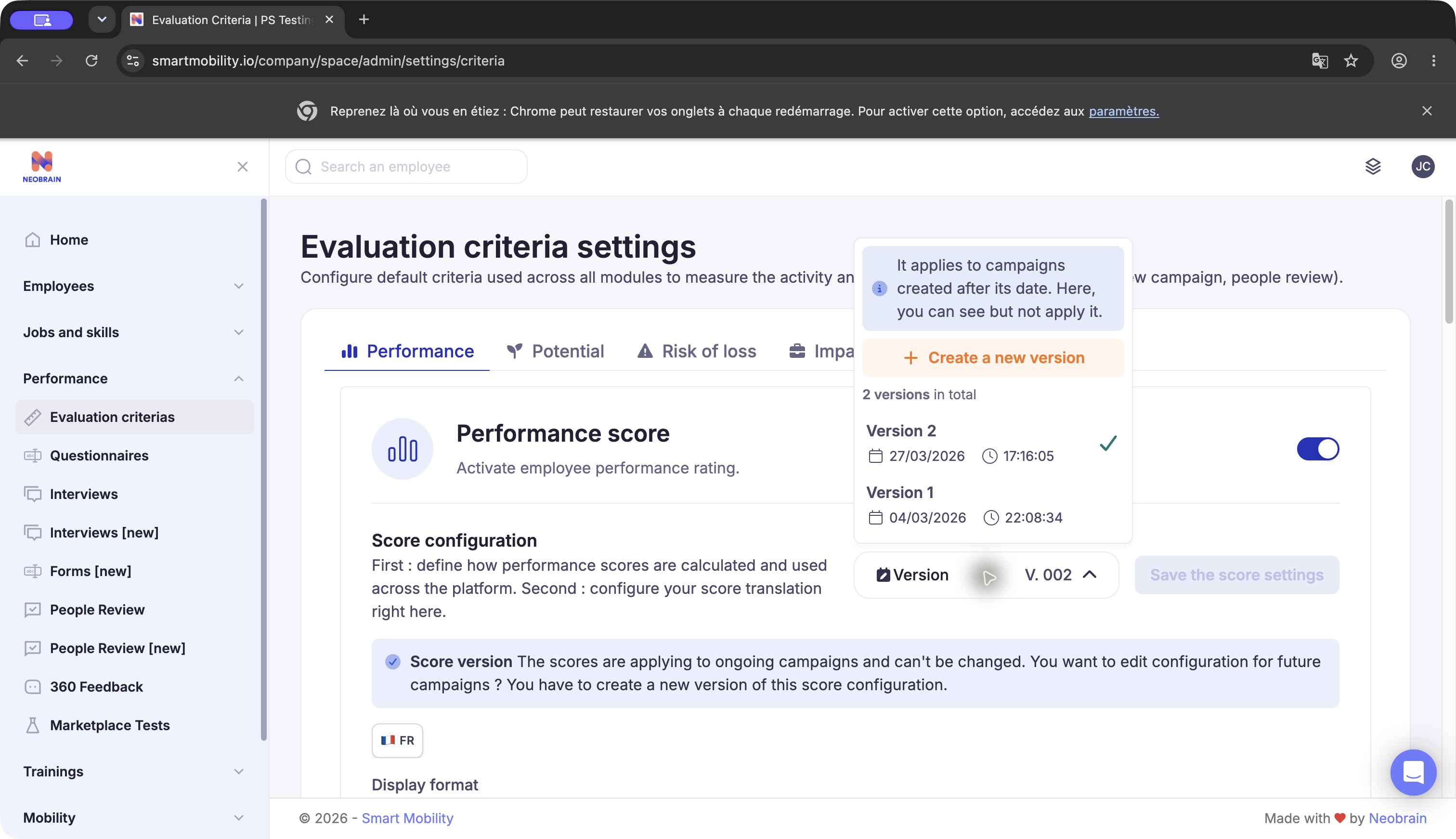
Version menu in Chrome. It lists two Performance versions and “Create a new version”; the notice says history can be viewed without applying it. No version was created during verification.
SMR — formats, labels and scope
| Setting | Supported behavior / evidence | Effect |
|---|---|---|
| Criterion activation | Independent criterion switches observed; four configuration slugs verified in code. | Makes the criterion available to consuming flows; not proof that every campaign uses it. |
| Points | Configured range and per-value labels. PRD specifies supported bounds within 1–10. | Displays an ordinal score in the chosen range. |
| Percentage | 0–100% with endpoint labels; PRD and frontend support. | Endpoint descriptions do not create intermediate qualitative bands. |
| Letters | Configured base-letter range and labels; A is highest in the PRD. | Display conversion differs from numeric label order. Do not sort scores alphabetically. |
| Languages | Main language defines structure; localized titles/labels supported in code. | Ensure required labels are complete after scale changes. |
| Preview | Observed simulated score panel. | Demonstrates display; it is not a recalculation of employee results. |
The inspected tenant used Performance 1–5, weighted Potential 1–5, Risk 1–5 and Impact 1–3. These values are observed examples, not inherited defaults. The code contains component defaults that differ from loaded tenant settings; always read the saved configuration.
SMR — Performance
Target behavior defined by the PRD: choose standard/manual or advanced/calculated Performance. Standard needs the display scale. Advanced adds the following settings:
| Control | Choices / constraint | Purpose |
|---|---|---|
| Included skills | All skills or job-related skills. | Restricts the skills component. |
| Skill types | Hard skills, soft skills or all skill types. | Further restricts source skills. |
| Skills — Employee vs reviewer Weight | 0–100% balance; the complementary share makes the total 100%. | Combines skill assessments. |
| Objectives configuration — Employee vs reviewer Weight | Independent 0–100% balance, also totaling 100%. | Combines performance-goal assessments. It does not reuse the skills weight. |
| Overall weight distribution — Skills vs Goals | 0–100% balance totaling 100%. | Combines component results when both sources are used. |
Observed: skills employee/reviewer = 20%/80%, goals employee/reviewer = 20%/80%, overall skills/goals = 80%/20%. These are tenant values. PRD rule: two evaluators split the reviewer share equally; administrators do not configure their individual shares. A nonparticipating second evaluator leaves the reviewer share with the primary evaluator.
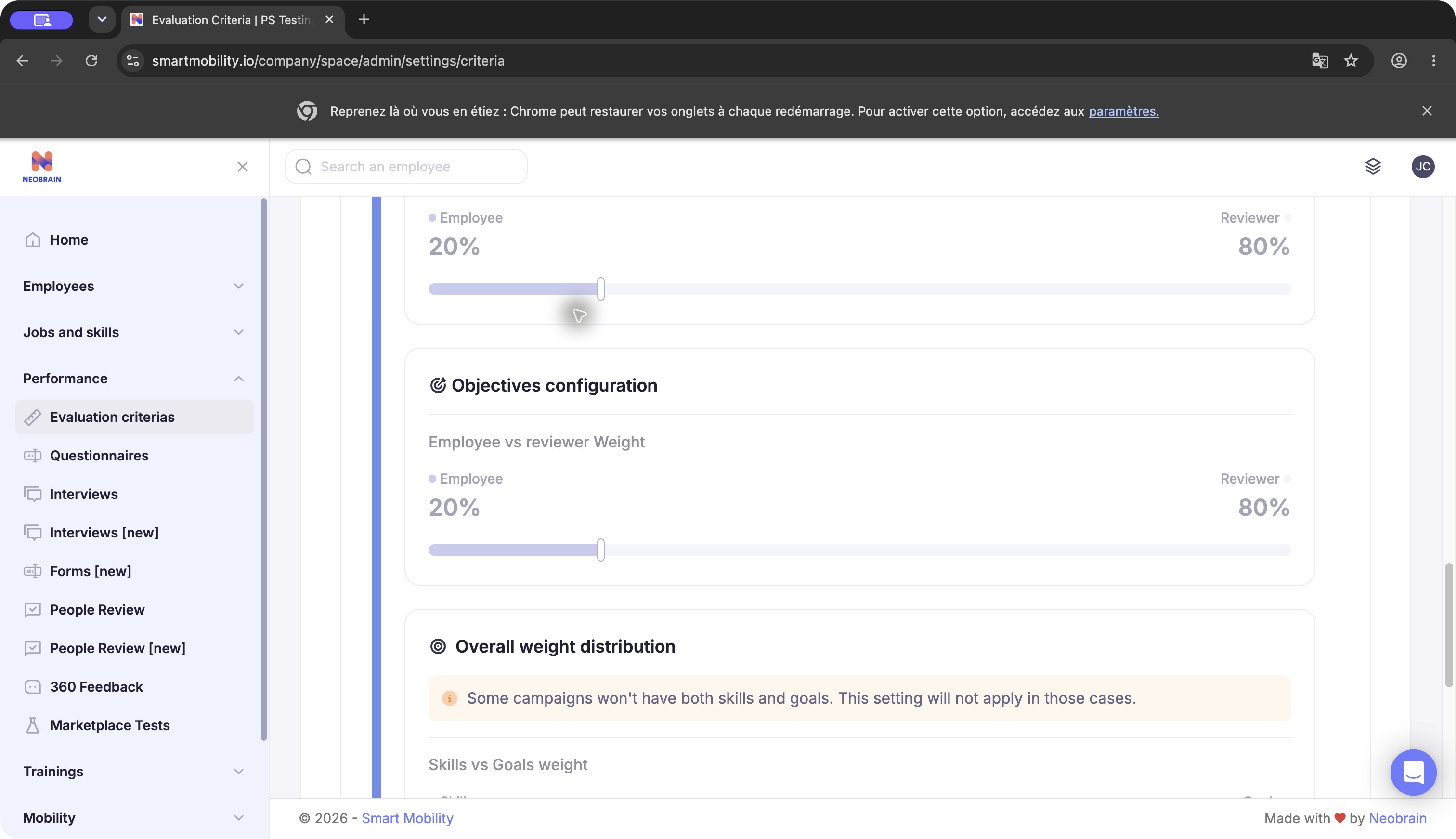
Chrome shows “Objectives configuration” with its own Employee vs reviewer Weight, followed by Overall weight distribution. Goal participation weights and skills/goals mixing are separate controls; values belong to this tenant.
Campaign dependencies
The Performance PRD defines company settings first, then campaign activation. Enable Performance in the review campaign; in advanced mode choose skills, goals, or both. Include the corresponding Smart Questions and enforce their mandatory status. Validate sources before launching.
PRD specification: choose Employee and Second Evaluator override information visibility: Always, Never, or Only when overridden score is higher. This groups original score, calculation details and justification; ordinary comments retain normal campaign sharing. Live campaign configuration and PDF enforcement were not tested. Do not assume a default visibility policy.
Configure the required Question label for Performance. It defines the score name reused in the review, final PDF and employee profile history.
SMR — Potential
Choose a direct/custom score or weighted questions (verified in code). In weighted mode, define question titles, optional descriptions, response labels and weights summing to 100%. Review both subquestion scales and the overall display. The inspected question description counter showed a 200-character maximum. A changed range can leave translated labels empty; complete them before saving.
Observed: four questions at 25% each. Verified in code: the People Review calculator normalizes each eligible answered question and divides its weighted sum by the sum of included weights. A question with no answer, no options or a nonpositive weight is skipped; a fully empty calculation returns zero. Configuration validation and runtime handling are distinct.
Use the direct/custom method when the evaluator is expected to select an overall Potential scale value; use weighted questions when the result should summarize several defined dimensions. In weighted mode, give each dimension an unambiguous title, a consistent response scale and a weight that reflects its relative contribution. The four observed dimensions (learning/progression, initiative/responsibility, problem solving, adaptability) are tenant wording only. A 25% / 25% / 25% / 25% setup gives equal influence; it does not imply that every organization should use equal weights.
SMR — Risk of loss and Impact of loss
Configure the two criteria separately: display format, supported scale and labels in each relevant language. These are scale questions in the backend; weighted Potential is not a supported type for these configuration keys. Ensure labels distinguish departure risk from business impact.
For Risk of loss, define what each level means to evaluators (for example, how to distinguish low, medium and high assessed risk in the context of the company). For Impact of loss, define the organizational consequence represented by each level, such as service continuity or loss of scarce expertise. These examples help write clear labels; they are not built-in SMR dimensions. Keep the scales independently meaningful and do not make their numeric ranges look directly comparable unless the company intentionally adopts equivalent anchors. Neither criterion has a verified weighting against Performance or Potential.
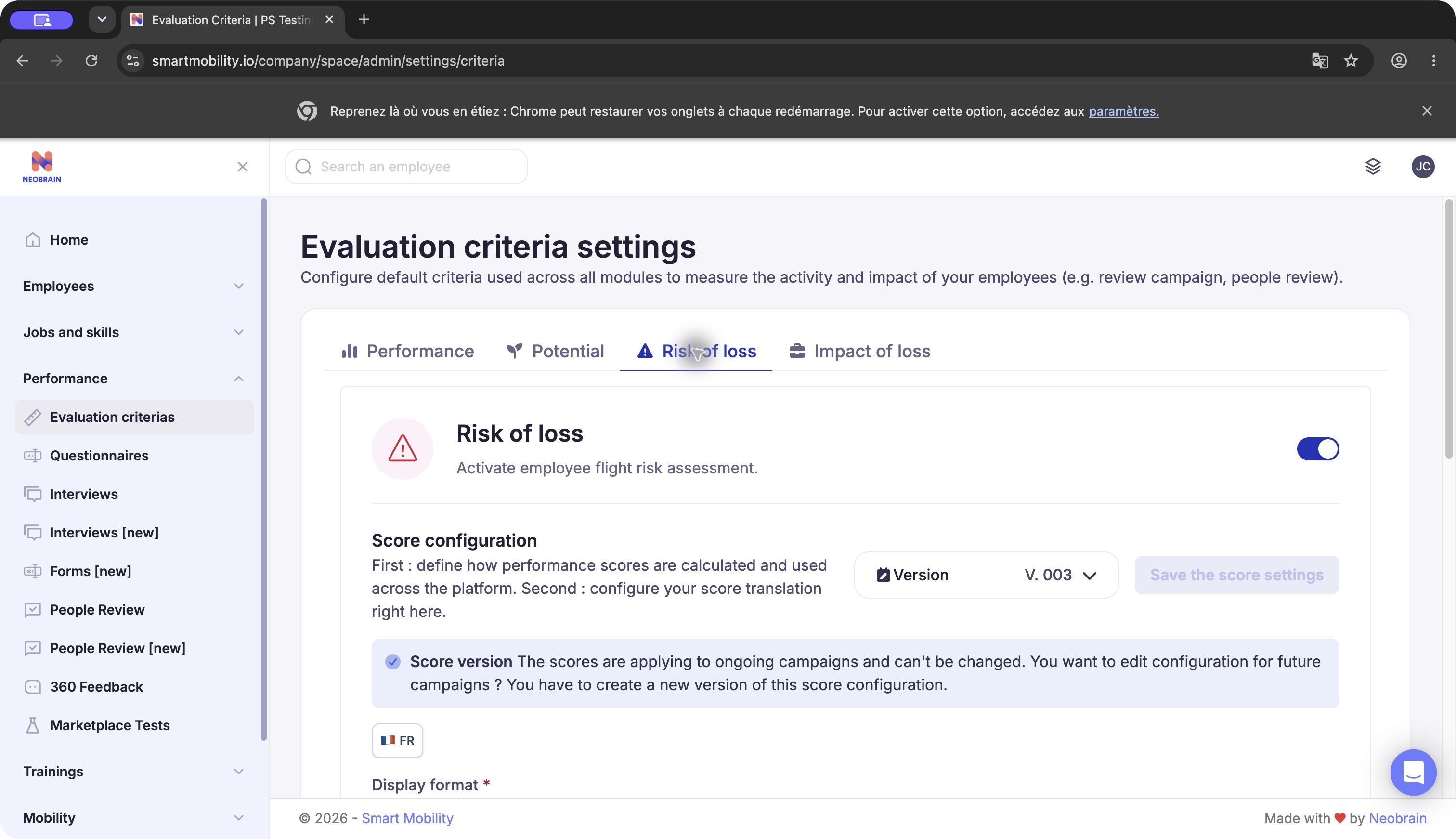
Risk of loss settings in Chrome. The tab has its own activation and version (V.003 in this tenant). The version is separate from Performance and Potential.
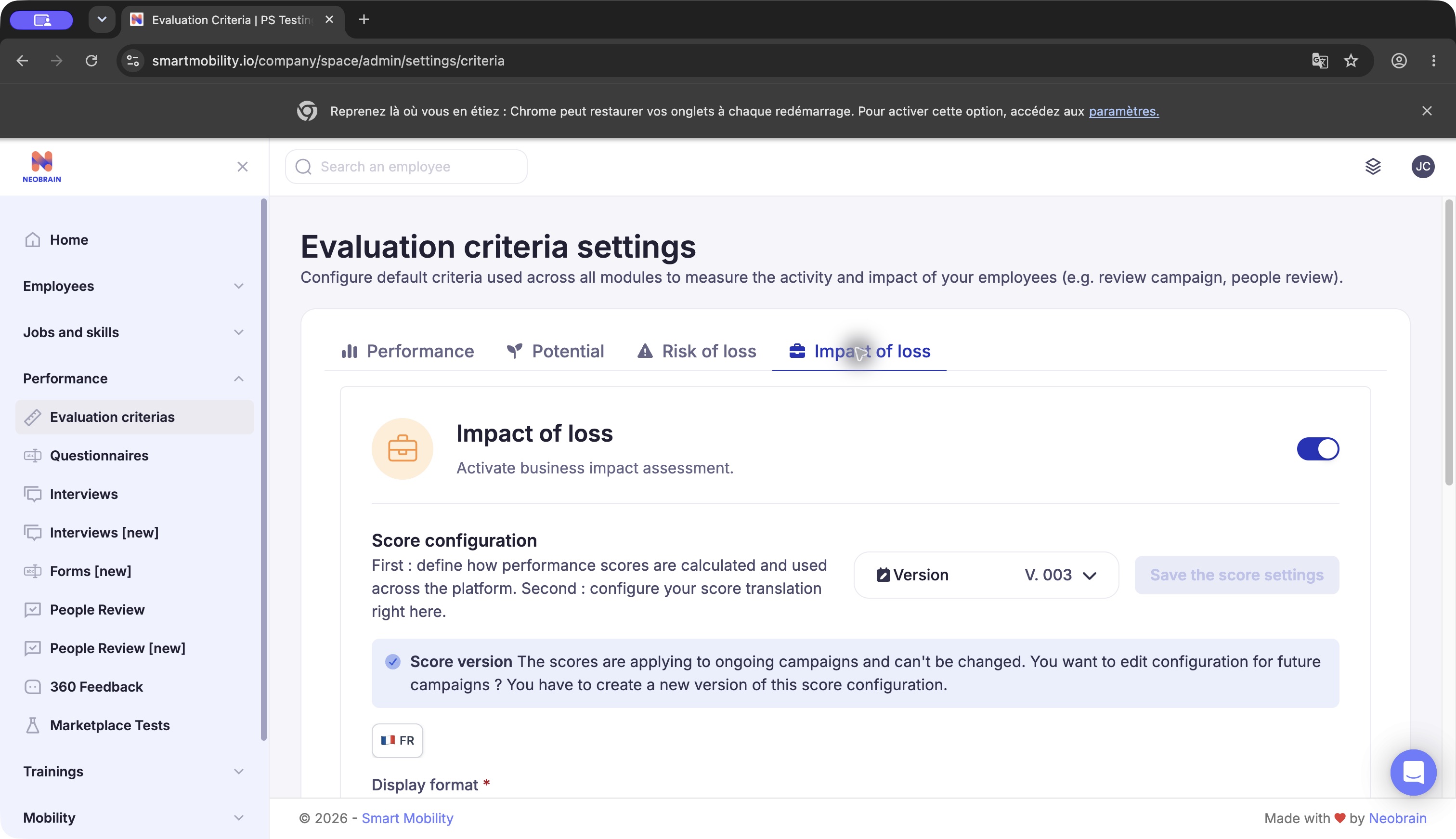
Impact of loss settings in Chrome. The criterion has its own scale and version; its presence does not establish an automated departure-impact prediction.
SML — configure the actual campaign definition
Verified in code; live administration not inspected: SML indicators are attached to a legacy review campaign. Its indicator controller saves labels, positions and types, including select, choice and range, with options. Manual participant indicator values are separate from calculated questionnaire section scores.
For section calculation, check the linked assessment questionnaire, a section’s associated indicator and its result bands, then the choice/range answer scores. Without an indicator and eligible positive-sum scoring options, a section does not accumulate question scores in the helper. Do not copy SMR employee/reviewer percentages into this legacy calculation: the verified section helper does not use them.
The inspected SML code does not establish a universal company screen configuring these four named scores. Have the campaign owner verify which section or indicator implements each business criterion. Tenant-specific mapping, live UI labels and permissions remain not verified.
The legacy review table also has participant values for performance, potential and risk, with a completion check that requires those three fields. That is evidence of separate legacy fields, not proof that they share the ReviewIndicator/section-score calculation. The inspected table does not expose an impact-of-loss field. For each campaign, record whether a value comes from that table, a manually selected campaign indicator, or a calculated questionnaire section; then inspect its configured options and scoring bands. This distinction helps avoid treating a free-text/label selection as the numeric section average.
Validate changes and recover safely
Before use, review required labels in every configured language, weight totals, version, activation, source questions and campaign generation. Verify on an authorized test campaign with known assessments; compare one-source and two-source cases and participant visibility. This verification session did not modify production settings or create test records.
Historical version selection is a viewing action, not a rollback. To correct a used configuration, prepare a new version with the intended settings and check its use by future campaigns. Automatic recalculation of completed reviews, bulk retroactive changes and a one-click rollback were not established.
| Problem | Check |
|---|---|
| Save unavailable | Lock state, unchanged content, required labels, main language and validation messages. |
| Weighted Potential rejected | Required titles/labels, question configuration and total weight of 100%. |
| Backend rejects criterion reference | Question existence, expected type and whether another criterion already uses the same question ID. |
| Translation incomplete | Main-locale content and labels added or removed by a range/format change. |
| Existing campaign unchanged | Its stored criterion/version and campaign sources; a new company version does not imply retroactive application. |
| Legacy section unexpected | Eligible responses and indicator bands; see SML calculation. |
Evidence and limitations
Observed in application: all four tabs, used versions, menu history, scales, Potential weights and Performance skill/goal controls in Chrome, 28 October 2026. No saving, translation or activation was performed. Verified in code: configuration keys, types, frontend locks, API calls and SML storage/calculation. PRD specification: campaign and historical expectations. Not verified: universal defaults, SML live setup, full campaign lifecycle, retroactive migration and output visibility. Source inventory: technical guide.
Last updated on 3 November 2026