Data Analysis — configuration guide
This guide is for administrators configuring access to the legacy manager dashboard. Daily analysis is covered by the functional guide; implementation details are in the technical guide.
Ownership and generation
| Owner | Legacy | Redesigned / nextgen |
|---|---|---|
| Project/platform team | Register and activate dashboard switches, configure tenant capability and check runtime dependencies. | No replacement configuration surface for this route established by targeted source searches. |
| Customer administrator | Maintain authorized manager access, team hierarchy, visibility and source data through existing administration processes. | No equivalent dashboard-specific settings screen verified. |
These are independent dimensions: the manager dashboard is legacy even when another application shell links to it. Do not assume nextgen settings override legacy switches or that a migration exists.
Customer administrator preparation
Verified in code: this dashboard consumes manager access, hierarchy, relationship assignments, job requirements, employee skills and campaign data. It is an analysis screen, not a dashboard designer or a settings editor. No dashboard-specific customer configuration screen was verified live.
- Identify intended managers and their permitted employee population. Use the roles and permissions guide to review the available administration process.
- Check manager records and reporting lines. Missing or disabled employees can produce empty or partial results; the current manager is excluded from the perimeter count.
- Verify visibility policies and any supplementary hierarchical relationships. Relationship filters need both activation and assignments involving the current manager.
- Check jobs and expected skills before enabling mastery/gap panels. An employee skill level without a job requirement does not establish a mastery gap.
- Check interview and skills-map campaign participation before expecting campaign details.
- Have the platform team confirm enabled tabs and graphs. Validate with a representative manager account before rollout.
Do not broaden company visibility just to make a chart appear. “Entire company” and the perimeter people icon are conditional administrator controls, not access-granting settings. The authenticated session exposed the administrator-conditioned All Employees population choice and perimeter icon. A dedicated customer-admin settings screen and its save procedures remain Not verified; these analysis controls do not edit permissions.
Observed analysis controls
Observed in application — 22 October 2026: the English manager view offers Filters → N − 1 / All my levels / All Employees → Apply. The whole-company selection loaded employees while N − 1 was empty for this test account. No relationship filter or job selector was visible. Four tabs were available; skills-map campaigns were absent. These observations establish this session’s interface, not its underlying switch values.
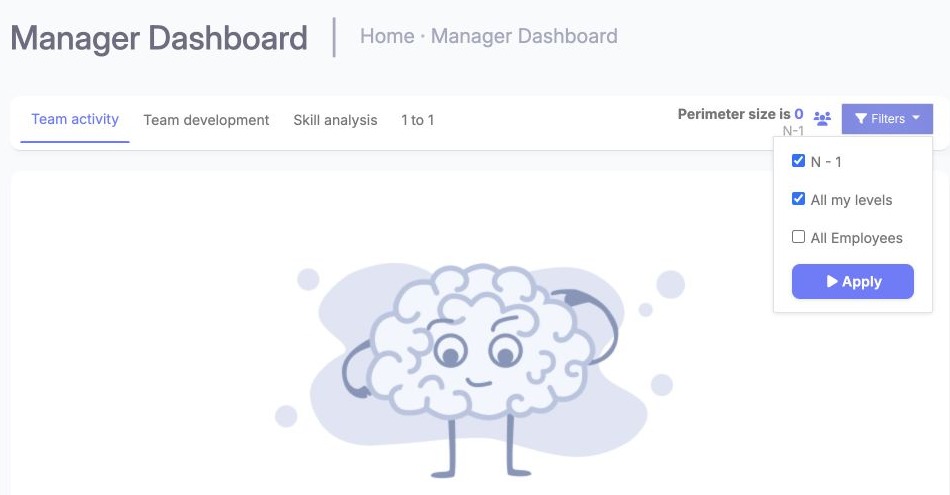
The open Filters menu contains the hierarchy and all-employee scope choices. Review the checked options, then use Apply to refresh the analysis population; the count describes the resulting scope. Manager view, English. All Employees is an analysis population control, not a tenant configuration editor.
The functional guide illustrates the results. No business settings, permissions or source records were changed.
Platform-team reference: activation and values
Verified in code: FeatureSwitchVoter delegates to FeatureSwitchService::isSwitchActive(settingId, slug). It accepts a stored value comparing equal to 1 or access supplied by the tokenizer service. Missing stored values do not establish an active switch; the alternate access path must also be checked. No tenant’s effective values were read. Do not infer universal on/off defaults from setup commands.
| Capability | Switch or permission | Scope / dependency |
|---|---|---|
| Main tabs | dashboard_team_activity, dashboard_team_proficiency, dashboard_skill_analysis, dashboard_team_1to1, dashboard_campaign | Tenant capability, evaluated separately per tab. The first enabled tab is selected. |
| Page/handler fallback | manager_dashboard in manager school permission roles | Helper::isManagerDashboardActive also returns true for an empty permission value. This does not itself create enabled tabs. |
| Relationship selector | dashboard_filter_user_relation | Requires relationships assigned to the current user. |
| Job restriction | dashboard_filter_by_job | Conditional selector for supported panels. |
| Login-related skill restriction | dashboard_filter_by_login | Restricts relevant skill queries to users with logincounter > 0; not an arbitrary date-range picker. |
| Activity panels | dashboard_graph_profile_completion, dashboard_graph_activity | Profile completion source and login records respectively. |
| Proficiency panels | dashboard_graph_job_mastery_ratio, dashboard_graph_average_gap_jobs, dashboard_graph_average_gap_users, dashboard_graph_skills_gap_level, dashboard_graph_motivation_ratio, dashboard_graph_job_representation | Job/employee skill and motivation data as appropriate. |
| Skills panels | dashboard_graph_skills_report, dashboard_graph_team_skills, dashboard_graph_team_motivation, dashboard_graph_top_skills, dashboard_graph_flop_skills, dashboard_graph_average_skill_levels, dashboard_graph_top_extra_skills, dashboard_graph_top_mastered_skills, dashboard_graph_flop_mastered_skills | Graph activation is independent from tab activation. |
| Campaign panels | dashboard_graph_completion_rate, dashboard_graph_user_progression, dashboard_graph_user_not_started, dashboard_graph_skills_changed | Skills-map campaign data and participants. |
| Alternate colors | dashboard_alt_color_scheme | Alternate palette; otherwise derived from tenant colors. |
dashboard_graph_unmastered_skills occurs in the template/source, but its data-generation branch is commented out in teamProficiencyAction; do not advertise activating it as a supported panel.
The setup classes under src/Company/ManagerDashboardBundle/Command/ define capability registration and the manager_dashboard permission. They write configuration and are evidence of implementation, not instructions for customer administrators to run in production. No command or setting was changed during documentation work.
Scope, persistence and dependencies
Global level/relationship choices are held in the current session, rather than saved as tenant configuration. filters stores selection keys; perimeter holds the latest population for details. The hierarchy is cached in session for 600 seconds and tied to the current user. This is a hierarchy cache lifetime, not a chart refresh or data-ingestion SLA.
The initial template checks N − 1 and session-selected levels. Initial whole-company selection is unchecked. Per-chart job and interview-campaign selectors are separate from tenant configuration. Skill scale comes from the tenant setting; motivation calculations can have their own fixed scale, so do not assume a single configurable scale drives every metric.
Required runtime components include Symfony/Doctrine with database access and working sessions, Twig/JavaScript assets, Highcharts, DataTables and Select2. No external BI account is established as a prerequisite for this route. The inspection does not establish ingestion timing or synchronization guarantees.
Validation, rollout and rollback
After an authorized configuration change, verify the visible tab, at least one intended panel, a known population, supported detail and a filtered export. Check with a restricted manager as well as an administrator. Compare employee sets before comparing percentages.
Test hierarchy-only and relationship-inclusive selections separately. The interview handler does not establish relationship users in the same way as other tabs; campaign detail JavaScript submits hierarchy levels only. Do not treat all detail views as automatically preserving a relationship-inclusive perimeter.
If a change produces unintended visibility, have the authorized owner restore the previously recorded access/activation values and revalidate affected accounts. No one-click rollback or propagation delay is verified. Removing a graph switch hides that capability; it is not an instruction to delete skills or campaign data.
Troubleshooting
- Page opens with no tabs: check individual tab switches, even if the manager dashboard permission allows the shell.
- Tab present, panel absent: check its separate graph switch and data prerequisites.
- Missing relationship option: check the filter switch, tenant relationships and assignments for the current manager.
- Empty/wrong population: check hierarchy, enabled status, visibility and the applied filter summary; session hierarchy cache can temporarily retain prior structure.
- Interview detail unavailable: check the interview tab switch and campaign existence. Its detail handler has a stricter switch check than the page fallback.
- Different overview/detail counts: check relationship handling and any local table/job/campaign selection.
Evidence and limitations
Verified in code: legacy src/Company/ManagerDashboardBundle/Services/Helper.php (hasAccess, isManagerDashboardActive, isAdmin), Controller/DefaultController.php, Command/, Resources/views/ and Resources/public/js/dashboard.js; src/Security/FeatureSwitchVoter.php, src/Security/Voter/BaseVoter.php, src/Service/Configuration/FeatureSwitchService.php (isSwitchActive, getValue). These paths describe local implementation, not deployed tenant configuration.
Documented in Confluence: the team matrix FAQ, v1, 24 September 2026, supports the team-level use case. Supplied PS pages Delivery Philosophy & Project Methodology, v7, 30 December 2025, and Onboarding/learning and partner certification, v9, 18 February 2026, were reviewed; neither establishes dashboard switch defaults or an administrator workflow. KBCT entry 2136702980 is the FAQ folder.
Observed in application: English and French manager population controls, available tabs and empty/populated results. Not verified: effective tenant values, dedicated customer-admin settings screens, inheritance across generations and release mapping. English/French population-control captures are included; settings-editor captures remain unavailable. No configuration was changed.
Last updated on 3 November 2026